Investing in Zoho CRM is a smart decision. But simply having a CRM does not automatically make your sales process more organized, efficient, or scalable.
Many businesses start using Zoho CRM with good intentions and still end up disappointed. Reports become unreliable. Automations create confusion. Teams stop updating records properly. Over time, the CRM starts to feel like just another tool that nobody fully trusts.
In most cases, the problem is not Zoho CRM itself.
The real issue is how the system is planned, structured, and used from the start.

A few early mistakes, such as importing messy data, over-customizing fields, skipping team training, or building workflows without clear logic, can create bigger problems later. What seems like a small setup issue in the beginning can slowly affect productivity, forecasting, user adoption, and customer follow-up.
The good news is that most of these mistakes are completely avoidable.
If you understand what usually goes wrong, you can build a Zoho CRM system that is clean, practical, easy for your team to use, and ready to support business growth. In this guide, we will look at the most common Zoho CRM mistakes and how to avoid them before they start costing your business time, money, and opportunities.
Why Zoho CRM mistakes happen in the first place
One of the biggest misconceptions about CRM implementation is the belief that software alone can fix broken sales processes. It cannot. Zoho CRM can improve visibility, automate routine work, and help teams manage leads and customers more effectively, but it can only strengthen a process that already has structure behind it.
If your lead management process is unclear, your sales stages are inconsistent, or your team has poor data habits, then your CRM will reflect those problems instead of solving them. That is why Zoho CRM should never be treated as just a software setup project. It should be treated as a business process project. The system must align with how your team actually sells, follows up, reports, and grows.
1) Starting without a clear CRM strategy
One of the most common mistakes businesses make is setting up Zoho CRM before clearly defining what they need it to do. They jump into creating modules, custom fields, pipelines, and automations without first mapping the customer journey or the internal sales process. The result is usually a CRM that feels busy but not useful.
When there is no clear strategy, teams use the system inconsistently. Managers struggle to trust the reports. Important sales information gets buried inside unnecessary fields and disconnected workflows. Instead of supporting the business, the CRM becomes another source of confusion.
The better approach is to define your sales process first. Identify how leads enter the pipeline, how they are qualified, who owns each stage, what actions move a deal forward, and which metrics matter most. Once that foundation is clear, Zoho CRM can be configured to support the business properly instead of forcing people to work around a weak setup.
2) Over-customizing fields and layouts
Zoho CRM offers a lot of flexibility, which is one of its biggest strengths. But that flexibility can quickly become a problem when businesses create too many custom fields, extra sections, and unnecessary layouts. In many cases, teams add fields just because they might be useful one day, not because they solve a real need today.
This creates clutter. Users have to scroll through long forms and fill out information that has little practical value. Important details become harder to find. Adoption drops because the system feels heavy and time-consuming.
A strong CRM setup is not the one with the most fields. It is the one with the right fields. Every custom field should support a clear purpose such as reporting, segmentation, automation, or decision-making. If a field does not help your team take action or generate insight, it probably does not belong in the system.
3) Ignoring validation rules and field dependencies
A CRM becomes unreliable very quickly when users can enter data however they want. Without validation rules and field dependencies, records often end up incomplete, inconsistent, or inaccurate. One sales rep may enter a phone number in one format, another may leave it blank, and another may type it into the wrong field altogether. These small issues create bigger problems later in reporting, segmentation, and automation.
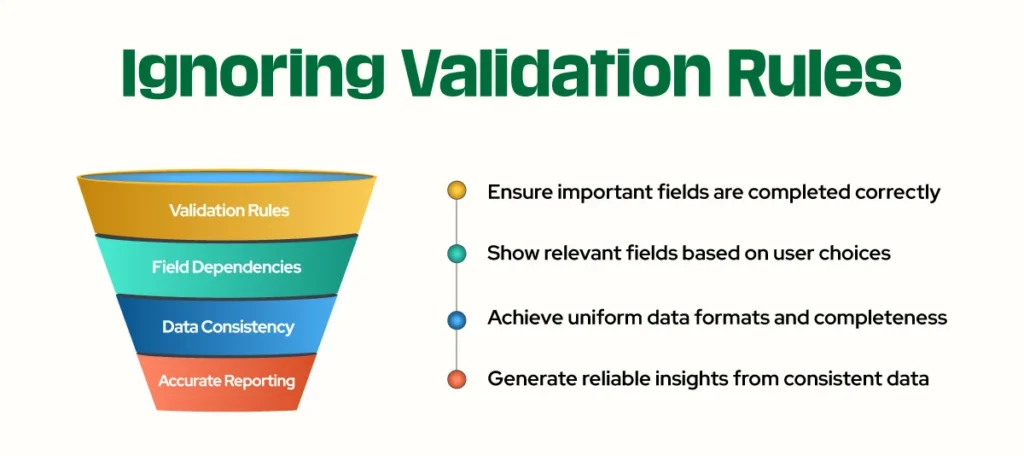
For example, if a deal is marked as closed lost without selecting a reason, your pipeline report loses valuable insight. If users can freely type lead sources instead of choosing from a standard list, your attribution reporting becomes messy.
Validation rules help protect data quality by making sure important fields are completed correctly. Field dependencies make the system more intuitive by only showing relevant fields based on user choices. Together, they create a cleaner and smarter CRM experience that reduces mistakes without making the system harder to use.
4) Using tags where picklists should be used
Tags may seem like a quick and flexible way to organize records, but they often create inconsistency over time. Different users may create different versions of the same label, which makes filtering and reporting far less reliable. One person may use “Hot Lead,” another may use “hotlead,” and someone else may use “priority lead” for the same type of contact.
That kind of inconsistency becomes a problem when you want to segment leads, trigger automation, or analyze trends across the pipeline.
For core business categories, structured fields are much more effective than tags. Picklists standardize the data and make sure everyone is using the same values. Tags still have a place for temporary labeling or lightweight internal tracking, but they should not be used as the main structure for important CRM data.
5) Importing messy or duplicate data
A Zoho CRM setup can fail early if the data being imported is already poor in quality. This often happens when businesses migrate contacts from spreadsheets, old CRMs, multiple inboxes, or disconnected systems without cleaning the data first. Duplicate records, outdated phone numbers, inconsistent company names, and incomplete contact details all reduce trust in the system.
Once users stop trusting CRM data, they stop relying on the CRM. They may keep their own notes outside the system, avoid updating records, or question the accuracy of reports and forecasts. That creates even more problems over time.
The smartest move is to clean your data before importing it. Remove duplicates, standardize formats, align field mappings, and archive records you no longer need. It is also a good idea to test the import using a small sample first. A clean database from day one makes every part of Zoho CRM work better later.
6) Building automation without clear logic
Automation is one of the biggest reasons businesses choose Zoho CRM, but it is also one of the areas where mistakes happen most often. Many teams build workflows too quickly without fully understanding what should happen, when it should happen, and under which conditions it should be triggered.
The result can be messy. Duplicate tasks get created. Emails are sent at the wrong time. Fields update incorrectly. Records move through the pipeline without real action behind them. Instead of saving time, automation starts creating confusion.
Good automation should feel helpful and almost invisible. It should reduce manual work, not increase noise. Before building any workflow, take time to map the process clearly. Understand the trigger, the condition, and the expected outcome. Test everything before launch. A few extra minutes of planning can save hours of cleanup later.
7) Failing to define roles, profiles, and permissions
Many businesses give everyone broad access when first setting up Zoho CRM because it feels faster and easier. But as the system grows, that decision often becomes a problem. Not every user should be able to edit every record, change every field, or access every setting.
Without proper permissions, accidental changes become more likely. Sensitive data may be visible to the wrong people. Admin-level settings can be changed without control. Over time, this affects security, accuracy, and governance.
A better setup gives access based on responsibility. Sales reps should see what they need to manage their pipeline. Managers should have broader visibility into team performance. Administrators should control critical settings and structure. Clear roles and profiles help protect data while also making the system easier to manage as the business grows.
8) Skipping user training and SOP documentation
Even the best CRM setup can fail if users do not know how to use it properly. This is one of the biggest reasons businesses struggle with adoption after implementation. When people are unclear about what to enter, how to move deals, or when to update records, they create their own habits. That leads to inconsistency across the system.
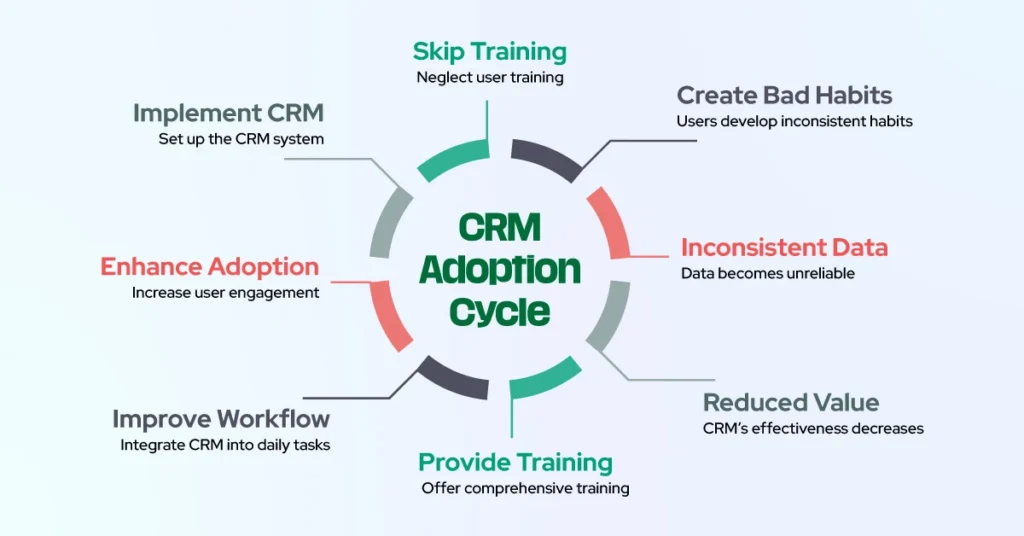
Some users may ignore required steps. Others may enter incomplete information. Some may not use the CRM at all unless management pushes them. When this happens, reporting becomes unreliable and the value of the system drops quickly.
Training should not only explain which buttons to click. It should explain how the CRM fits into each person’s daily workflow. Standard operating procedures should guide users on how to create records, update deals, log activities, assign follow-ups, and keep data accurate. The more clearly your team understands the process, the stronger adoption becomes.
9) Not using mobile CRM effectively
Sales does not only happen from a desk. Reps are often in meetings, on calls, traveling, or working remotely. If Zoho CRM is treated like a desktop-only tool, updates are delayed and important details are more likely to be forgotten.
This affects speed and visibility. A rep may forget to log a call, delay updating a deal stage, or miss an important follow-up because the information was not entered at the right time. Small delays like these can weaken pipeline accuracy and customer experience.
The mobile CRM experience should be part of your workflow, not an afterthought. When sales reps use the mobile app to add notes, check records, update stages, and set reminders in real time, the CRM becomes more accurate and more useful for everyone.
10) Building for today instead of for scale
Many businesses configure Zoho CRM to solve immediate problems without thinking about how the system will perform six months or a year later. What works for a small team often becomes difficult to manage once the business grows, the pipeline gets more complex, or new products and services are added.
This usually shows up in the form of inconsistent naming, hardcoded workflows, one-off fixes, and field structures that no longer make sense as the business evolves. Eventually, the CRM becomes harder to maintain and more expensive to improve.
A strong Zoho CRM setup should be simple enough for today but structured enough for tomorrow. That means using consistent naming conventions, documenting your workflows, creating clean field architecture, and avoiding unnecessary shortcuts that will become problems later. Building for scale does not mean making the system complicated. It means making it sustainable.
Quick checklist: how to avoid Zoho CRM mistakes
Avoiding Zoho CRM mistakes comes down to making better decisions early and staying disciplined as the system grows. Start by defining your sales process before setup so the CRM reflects how your business actually works. Keep your fields and layouts clean so users can work quickly without confusion. Use validation rules and controlled field values to protect data quality. Clean your records before importing them so your team starts with accurate information they can trust. Build automation carefully, not casually. Set up user permissions based on role and responsibility. Train your team properly and give them clear SOPs to follow. Encourage mobile CRM use so records stay updated in real time. Most importantly, build the system in a way that can support future growth without forcing a complete rebuild later.
Final thoughts
Zoho CRM is a powerful platform, but power without structure creates problems.
Most CRM frustrations do not come from the software itself. They come from unclear processes, poor setup decisions, messy data, weak adoption, and shortcuts that become bigger issues over time. The businesses that get the best results from Zoho CRM are usually not the ones that build the most complex system. They are the ones that build the most thoughtful one.
When Zoho CRM is set up with clarity, discipline, and long-term thinking, it becomes much more than a place to store contacts and deals. It becomes a reliable system that supports sales performance, improves accountability, strengthens reporting, and helps your business scale with confidence.
If your current Zoho CRM setup feels cluttered, inconsistent, or underused, now is the right time to fix it. A smarter structure today can save your team significant time and frustration tomorrow.
Ready to get more value from Zoho CRM?
If your Zoho CRM feels harder to use than it should, the problem may not be the platform. It may be the setup.
The right strategy, structure, and workflow design can turn Zoho CRM into a system your team actually wants to use. That means cleaner data, better reporting, stronger adoption, and a sales process that runs with more clarity and less friction.
Whether you are setting up Zoho CRM for the first time or trying to improve an existing system, taking the time to fix the foundation will always pay off.