Business teams often depend on a patchwork of spreadsheets, email threads, and shared docs to get work done. But these quick fixes create chaos as the team grows. What you need is a set of internal tools tailored to how your team works, and fast.
That’s where Zoho Creator, a powerful low-code app builder, steps in. It enables anyone on your team, even those without coding experience, to create fully functional internal apps. Whether it’s a time-off request form or a project approval tracker, Zoho Creator gives you the tools to make it happen without waiting on IT.
Let’s dive into how to use Zoho Creator to transform clunky processes into sleek, automated workflows.
What Is Zoho Creator?
Zoho Creator is a low-code development platform that helps teams build custom apps quickly. It’s built for business users who know what they need but don’t have the technical background to code apps from scratch.

Instead of writing lines of complex code, users create forms and workflows using drag-and-drop tools and simple logic scripting called Deluge. Apps built in Zoho Creator are mobile-ready by default and can be published across teams, departments, or even customers.
It’s perfect for internal tools like:
- Time-off or expense request forms
- Inventory check-in or check-out systems
- Employee onboarding checklists
- Custom quoting engines
- Project or IT request trackers
Why Internal Tools Matter?
Internal tools are the glue that holds your team together. They support processes that may not always appear in customer dashboards but are crucial for smooth operations.
Without proper tools, teams often resort to using spreadsheets, manual data entry, and repetitive follow-ups. That leads to errors, wasted time, and frustrated employees.
Internal tools built with Zoho Creator help solve that by:
- Automating repetitive tasks
- Reducing manual errors
- Centralizing information
- Improving accountability and tracking
- Speeding up decision-making
Key Features of Zoho Creator That Make It Ideal
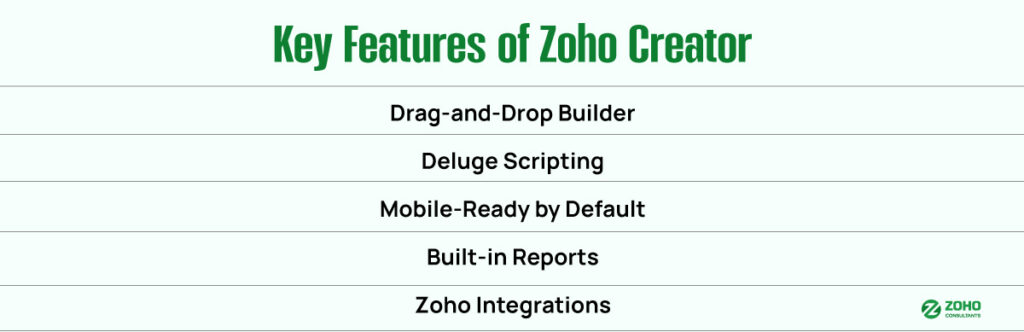
Drag-and-Drop App Builder
Building forms, dashboards, and reports is as easy as dragging fields into their designated places. You can add text boxes, date pickers, drop-down menus, file uploads, and more. This allows you to design tools exactly as your team needs them, without writing a single line of code.
Deluge: Scripting That’s Simple
For more advanced workflows, Zoho Creator uses Deluge, a user-friendly scripting language. With Deluge, you can:
- Trigger actions when a form is submitted
- Auto-calculate totals or due dates
- Send notifications
- Update records based on logic
- Pull data from other apps
Even if you’re not a developer, the syntax is clean and easy to learn.
Mobile-Ready by Default
Every app you build in Zoho Creator is automatically optimized for phones and tablets. That means field teams, remote workers, or office staff can all use your tools on the go without needing separate mobile app development.
Built-In Reports and Dashboards
Track performance, see trends, and make better decisions with Zoho Creator’s reporting features. Visualize everything from total time-off days taken to expense request trends using charts and custom dashboards.
Native Zoho Integrations
Zoho Creator integrates seamlessly with other Zoho apps, like:
- Zoho CRM (sync customer or deal data)
- Zoho Books (create invoices or manage expenses)
- Zoho Desk (link support tickets with internal tasks)
- Zoho People (pull employee data)
This makes it easy to create cross-functional workflows with minimal setup.
Real-World Examples of Internal Tools Built with Zoho Creator
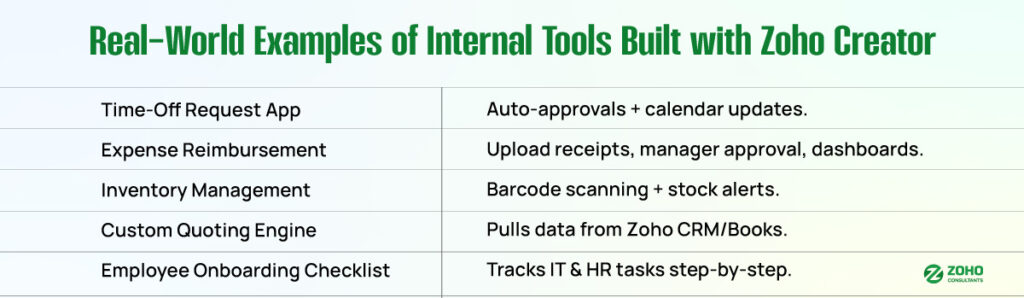
1. Time-Off Request App
HR teams can build a simple app where employees select dates, submit requests, and get approvals via email or in-app notifications. With Deluge, you can automatically block requests on holidays or weekends and update calendars accordingly.
2. Expense Reimbursement System
Finance teams can replace paper receipts and email threads with a central app. Employees upload receipts, categorize expenses, and managers approve them in a few clicks. Dashboards can show pending approvals and monthly expense totals.
3. Inventory Management Tool
Operations teams can track product check-ins and check-outs using barcode scanning and receive real-time stock updates. Notifications can alert teams when inventory levels reach low thresholds. You can even assign items to employees for asset tracking.
4. Custom Quoting Engine
Sales teams can build a quoting tool that pulls prices from Zoho CRM or Books and applies custom discount rules. Once finalized, the app can generate a PDF or directly push the quote into the CRM.
5. Employee Onboarding Checklist
HR or IT teams can use Zoho Creator to build a task tracker for new hires. From assigning laptops to scheduling training sessions, every step is tracked in one place. Notifications remind team members of what’s next.
How to Get Started with Zoho Creator?
Step 1: Identify the Workflow You Want to Replace
Pick a process that’s manual, slow, or error-prone. Start simple, like a request form or approval flow.
Step 2: Use the Form Builder to Design Your App
Drag and drop fields onto the form. Add instructions or placeholder text so users know exactly what to do. Use field rules to hide or show fields based on user input.
Step 3: Add Logic with Deluge
Would you like to send a notification when a request is approved? Or calculate due dates automatically? Use Deluge to build smart automations. If you’re stuck, Zoho’s documentation and community forums are great resources.
Step 4: Test and Share with Your Team
Preview the app, test all the workflows, and then publish it to your team. You can control who has access to what, ensuring only the right people see the correct data.
Step 5: Analyze and Improve
Once your app is live, use built-in reports to see how it’s being used. You might spot bottlenecks or steps that need tweaking. Zoho Creator lets you update apps without taking them offline.
Top Benefits for Operations and IT Teams
Operations leaders love Zoho Creator because it enables them to move quickly without waiting on development teams. Instead of managing a dozen disconnected spreadsheets, they can centralize data, automate approvals, and gain real-time visibility into their operations.
IT teams appreciate that Zoho Creator is secure, compliant, and scalable. You can set user roles, enable audit trails, and integrate with your existing systems.
Whether you’re running a startup or a global team, Zoho Creator helps build internal systems that grow with you.
Security and Compliance in Zoho Creator
Security is a top concern when building internal tools. Zoho Creator offers enterprise-grade features like:
- Role-based access controls
- Audit logs
- Two-factor authentication
- Data encryption at rest and in transit
- GDPR and HIPAA compliance options
This makes it suitable for teams in healthcare, finance, education, and other regulated industries.
From Manual to Magical with Zoho Creator
Internal processes shouldn’t be clunky or slow. With Zoho Creator, you can build exactly what your team needs faster, easier, and without coding.
Whether you’re managing employee data, streamlining approvals, or creating a custom dashboard for field teams, Zoho Creator gives you the tools to stop duct-taping spreadsheets and start building real systems.
Take control of your team’s workflow and empower every department with custom tools they’ll use.